Appearance
加载本地模型
这里加载的是量化版本,是
onnx-community/DeepSeek-R1-Distill-Qwen-1.5B-ONNX
本地硬件:
- 内存 32G
- 硬盘 1T
- CPU i7-10610U
- 显卡 Intel(R) UHD Graphics 128MB
- 操作系统 Win10
用cpu跑的,巨慢。用gpu可能快些吧。
WEB环境
- vite7
- vue3
使用库:@huggingface/transformers
- 先创建一个vite项目demo
bash
npm create vite@latest test-model-deepseek-r1-1.5b -- --template vue- 安装依赖
使用vscode打开项目,打开终端
bash
npm i @huggingface/transformers- 把下载的onnx文件拷贝到public文件夹下
具体文件目录为:public/models/onnx-community/DeepSeek-R1-Distill-Qwen-1.5B-ONNX
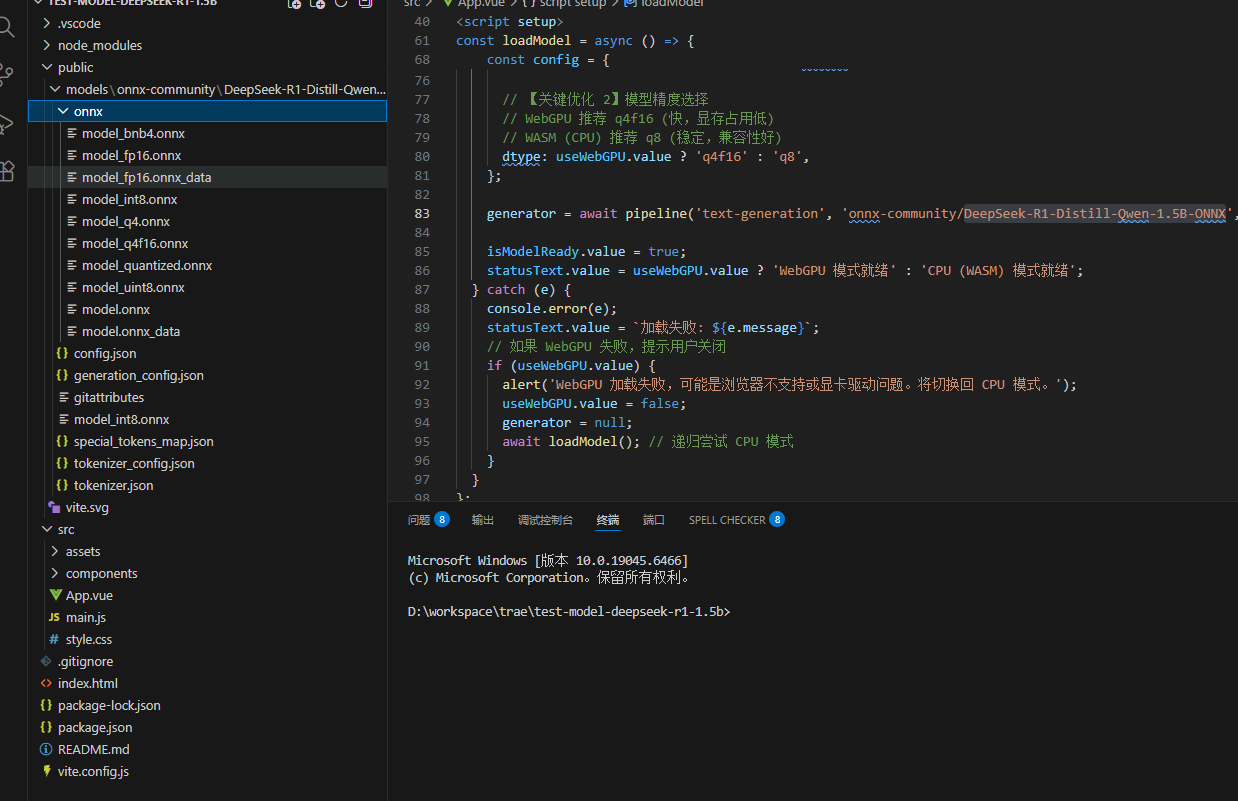
- 配置vite.config.js
主要是增加跨域配置
js
import { defineConfig } from 'vite'
import vue from '@vitejs/plugin-vue'


// https://vite.dev/config/
export default defineConfig({
  plugins: [vue()],
  // 关键配置1:让 Vite 将 .onnx 文件视为静态资源,而不是JS模块 [citation:1]
  assetsInclude: ['**/*.onnx'],

  // 关键配置2:排除 Transformers.js 依赖预打包,避免处理WASM时出错 [citation:1][citation:6]
  optimizeDeps: {
    exclude: ['@huggingface/transformers'],
  },

  server: {
    headers: {
      // 关键配置3:设置 COOP/COEP 头,这是 WASM 多线程支持所必需的 [citation:1]
      'Cross-Origin-Opener-Policy': 'same-origin',
      'Cross-Origin-Embedder-Policy': 'require-corp',
    },
  },
})- 替换App.vue文件
vue
<template>
  <div class="container">
    <h1>DeepSeek-R1 本地推理 (优化版)</h1>

    <div class="status-bar">
      <span>状态: {{ statusText }}</span>
      <span v-if="tokensPerSecond > 0" class="speed-badge">
        速度: {{ tokensPerSecond.toFixed(1) }} tokens/s
      </span>
    </div>

    <div class="chat-container">
      <div class="messages" ref="messagesBox">
        <div v-for="(msg, idx) in messages" :key="idx" :class="['msg', msg.role]">
          <div class="msg-content">{{ msg.content }}</div>
        </div>
        <div v-if="isGenerating" class="msg assistant">
          <div class="msg-content typing">正在思考... <span class="cursor">|</span></div>
        </div>
      </div>

      <div class="input-area">
        <textarea v-model="inputText" placeholder="输入问题..." @keydown.enter.prevent="sendMessage"
          :disabled="isGenerating"></textarea>
        <button @click="sendMessage" :disabled="isGenerating || !isModelReady">
          {{ isGenerating ? '生成中...' : '发送' }}
        </button>
      </div>

      <div class="controls">
        <label>
          <input type="checkbox" v-model="useWebGPU" @change="resetModel" />
          启用 WebGPU (需显卡支持,速度更快)
        </label>
      </div>
    </div>
  </div>
</template>

<script setup>
import { ref, nextTick, onMounted } from 'vue';
import { pipeline, env } from '@huggingface/transformers';

// --- 配置 ---
env.allowLocalModels = true;
env.localModelPath = '/models/';

// --- 状态 ---
const messages = ref([]);
const inputText = ref('你好');
const statusText = ref('点击发送加载模型');
const isGenerating = ref(false);
const isModelReady = ref(false);
const useWebGPU = ref(false); // 默认关闭,建议有能力用户开启
const tokensPerSecond = ref(0);
const messagesBox = ref(null);

let generator = null;

// --- 核心逻辑:加载模型 ---
const loadModel = async () => {
  if (generator) return;

  try {
    statusText.value = '正在加载模型... (首次可能较慢)';

    // 根据 WebGPU 开关选择配置
    const config = {
      progress_callback: (p) => {
        if (p.status === 'progress') {
          statusText.value = `加载模型: ${Math.round(p.progress)}%`;
        }
      },
      // 【关键优化 1】执行后端选择
      execution_provider: useWebGPU.value ? 'webgpu' : 'wasm',

      // 【关键优化 2】模型精度选择
      // WebGPU 推荐 q4f16 (快,显存占用低)
      // WASM (CPU) 推荐 q8 (稳定,兼容性好)
      dtype: useWebGPU.value ? 'q4f16' : 'q8',
    };

    generator = await pipeline('text-generation', 'onnx-community/DeepSeek-R1-Distill-Qwen-1.5B-ONNX', config);

    isModelReady.value = true;
    statusText.value = useWebGPU.value ? 'WebGPU 模式就绪' : 'CPU (WASM) 模式就绪';
  } catch (e) {
    console.error(e);
    statusText.value = `加载失败: ${e.message}`;
    // 如果 WebGPU 失败,提示用户关闭
    if (useWebGPU.value) {
      alert('WebGPU 加载失败,可能是浏览器不支持或显卡驱动问题。将切换回 CPU 模式。');
      useWebGPU.value = false;
      generator = null;
      await loadModel(); // 递归尝试 CPU 模式
    }
  }
};

// --- 核心逻辑:发送消息 ---
const sendMessage = async () => {
  if (!inputText.value.trim() || isGenerating.value) return;

  // 1. 准备
  if (!generator) await loadModel();
  if (!generator) return;

  const userText = inputText.value;
  messages.value.push({ role: 'user', content: userText });
  inputText.value = '';
  isGenerating.value = true;

  // 2. 添加一个空的助手消息用于流式填充
  messages.value.push({ role: 'assistant', content: '' });
  const currentMsgIndex = messages.value.length - 1;

  // 3. 性能统计
  const startTime = performance.now();
  let tokenCount = 0;

  try {
    // 【关键优化 3】流式生成
    const stream = await generator(userText, {
      max_new_tokens: 128, // 适当控制长度
      temperature: 0.7,
      top_p: 0.9,
      do_sample: true,
      stream: true, // 开启流式输出!
    });

    // 4. 逐个 Token 处理
    for await (const chunk of stream) {
      // chunk 结构通常是 { token: number, text: string, ... }
      // 有些版本的 output 结构可能略有不同,这里做兼容
      const newText = chunk.token?.text || chunk.generated_text || '';

      if (newText) {
        // 更新最后一条消息
        messages.value[currentMsgIndex].content += newText;
        tokenCount++;

        // 自动滚动到底部
        await nextTick();
        if (messagesBox.value) {
          messagesBox.value.scrollTop = messagesBox.value.scrollHeight;
        }
      }
    }

    // 5. 计算速度
    const endTime = performance.now();
    const duration = (endTime - startTime) / 1000; // 秒
    tokensPerSecond.value = tokenCount / duration;

  } catch (e) {
    console.error(e);
    messages.value[currentMsgIndex].content = `生成出错: ${e.message}`;
  } finally {
    isGenerating.value = false;
  }
};

const resetModel = () => {
  generator = null;
  isModelReady.value = false;
  statusText.value = '模型已重置,请点击发送重新加载';
  loadModel();
};

onMounted(() => {
  loadModel();
})


</script>

<style scoped>
.container {
  max-width: 800px;
  margin: 0 auto;
  padding: 20px;
  font-family: 'Segoe UI', sans-serif;
}

.status-bar {
  display: flex;
  justify-content: space-between;
  padding: 10px;
  background: #f0f2f5;
  border-radius: 8px;
  margin-bottom: 15px;
  font-size: 14px;
}

.speed-badge {
  background: #28a745;
  color: white;
  padding: 2px 8px;
  border-radius: 12px;
  font-size: 12px;
}

.chat-container {
  border: 1px solid #ddd;
  border-radius: 12px;
  overflow: hidden;
}

.messages {
  height: 400px;
  overflow-y: auto;
  padding: 15px;
  background: #fff;
}

.msg {
  margin-bottom: 12px;
  display: flex;
}

.msg.user {
  justify-content: flex-end;
}

.msg-content {
  padding: 10px 15px;
  border-radius: 18px;
  max-width: 70%;
  white-space: pre-wrap;
  line-height: 1.5;
}

.msg.user .msg-content {
  background: #007bff;
  color: white;
  border-bottom-right-radius: 4px;
}

.msg.assistant .msg-content {
  background: #f1f3f5;
  color: black;
  border-bottom-left-radius: 4px;
}

.typing .cursor {
  animation: blink 1s infinite;
}

@keyframes blink {

  0%,
  50% {
    opacity: 1;
  }

  51%,
  100% {
    opacity: 0;
  }
}

.input-area {
  display: flex;
  padding: 15px;
  border-top: 1px solid #eee;
  background: #fafafa;
}

textarea {
  flex: 1;
  resize: none;
  border: 1px solid #ccc;
  border-radius: 8px;
  padding: 10px;
  margin-right: 10px;
  height: 40px;
  font-size: 16px;
}

button {
  background: #007bff;
  color: white;
  border: none;
  padding: 0 20px;
  border-radius: 8px;
  cursor: pointer;
  font-weight: bold;
}

button:disabled {
  background: #ccc;
  cursor: not-allowed;
}

.controls {
  padding: 10px 15px;
  font-size: 13px;
  color: #666;
  border-top: 1px solid #eee;
}
</style>
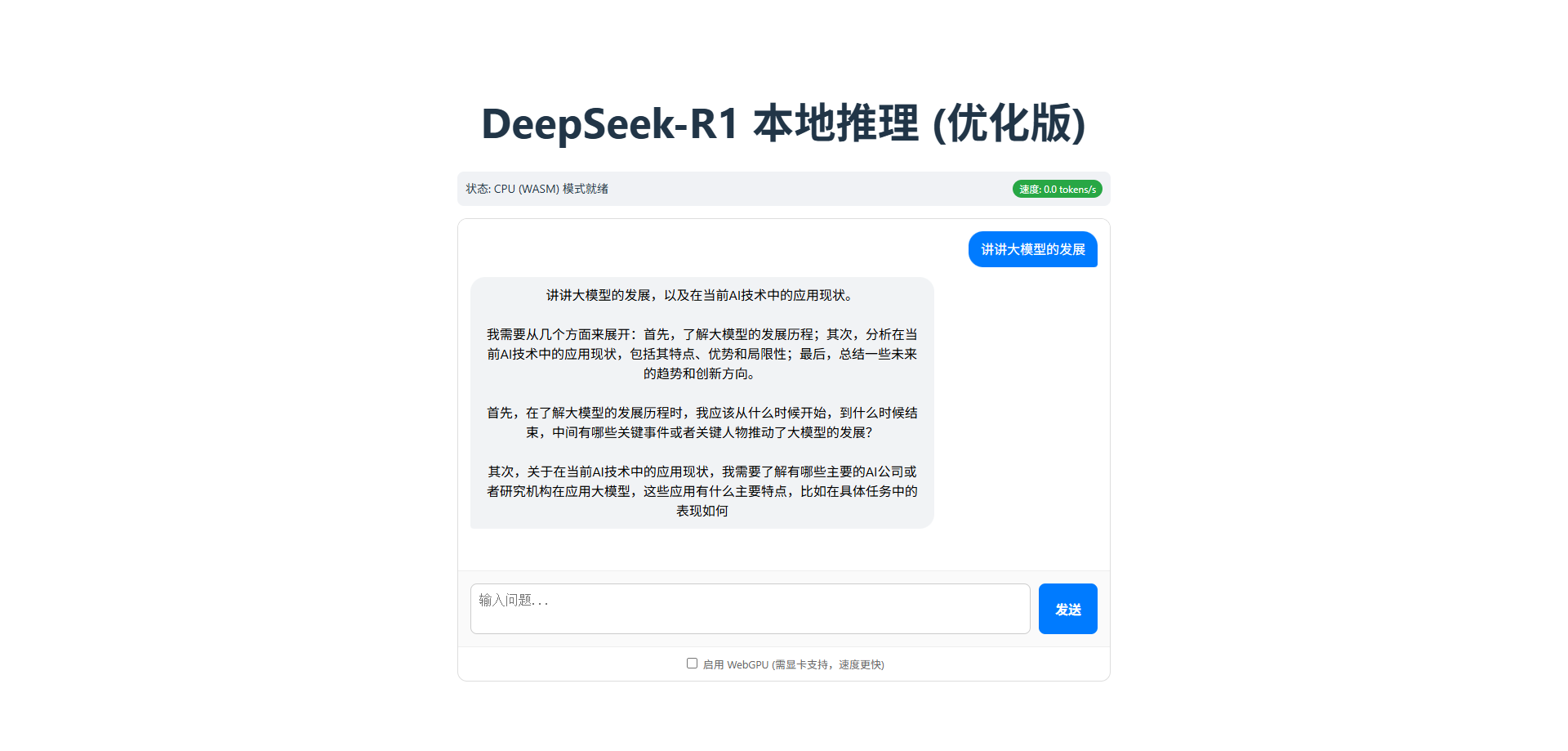
运行项目后,加载大模型需要1到3分钟。
发送消息,2到3分钟回答。
代码说明
App.vue文件中,关键代码
env
javascript
import { pipeline, env } from '@huggingface/transformers';

// --- 配置 ---
env.allowLocalModels = true;
env.localModelPath = '/models/';这是配置可以从本地加载模型,设置本地加载的目录是/models。
env的配置可以在官方文档找到。
pipeline
javascript
// 根据 WebGPU 开关选择配置
    const config = {
      progress_callback: (p) => {
        if (p.status === 'progress') {
          statusText.value = `加载模型: ${Math.round(p.progress)}%`;
        }
      },
      // 【关键优化 1】执行后端选择
      execution_provider: useWebGPU.value ? 'webgpu' : 'wasm',

      // 【关键优化 2】模型精度选择
      // WebGPU 推荐 q4f16 (快,显存占用低)
      // WASM (CPU) 推荐 q8 (稳定,兼容性好)
      dtype: useWebGPU.value ? 'q4f16' : 'q8',
    };

    generator = await pipeline('text-generation', 'onnx-community/DeepSeek-R1-Distill-Qwen-1.5B-ONNX', config);
pipeline 第一个参数是任务,有多种任务可选,官网文档有介绍任务类型
第二个参数是模型ID,也就是上面配置的本地加载目录/models文件夹下的对应目录,比如onnx-community/DeepSeek-R1-Distill-Qwen-1.5B-ONNX,这个目录再往下,配置文件在外面,onnx文件夹里面是模型文件。
第三个参数是pipeline的选项,在官网找不到,代码中可以看到一些。
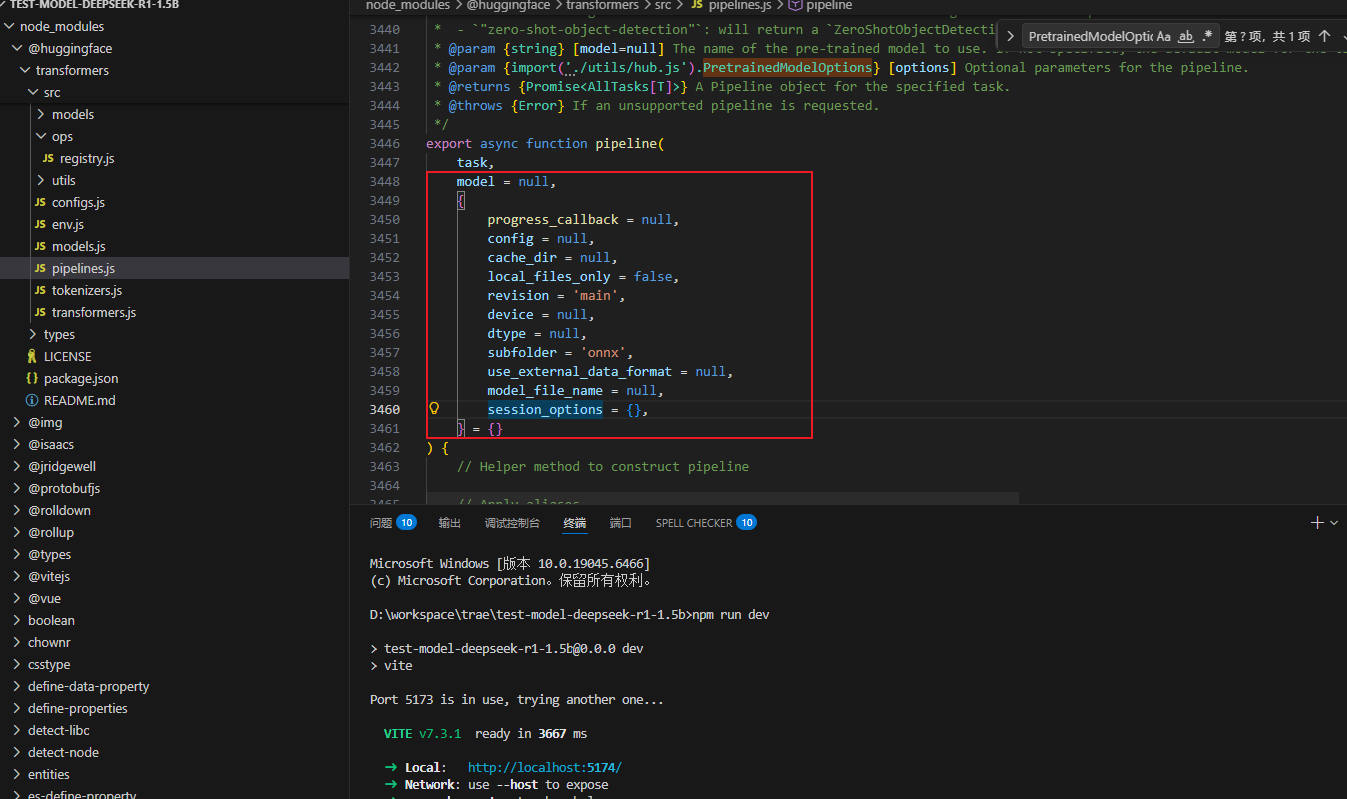
@param {import('./utils/hub.js').PretrainedModelOptions} [options] Optional parameters for the pipeline.
progress_callback = null,
config = null,
cache_dir = null,
local_files_only = false,
revision = 'main',
device = null,
dtype = null,
subfolder = 'onnx',
use_external_data_format = null,
model_file_name = null,
session_options = {},在utils/hub.js中找到注释了
javascript
/**
 * @typedef {Object} PretrainedOptions Options for loading a pretrained model.
 * @property {import('./core.js').ProgressCallback} [progress_callback=null] If specified, this function will be called during model construction, to provide the user with progress updates.
 * @property {import('../configs.js').PretrainedConfig} [config=null] Configuration for the model to use instead of an automatically loaded configuration. Configuration can be automatically loaded when:
 * - The model is a model provided by the library (loaded with the *model id* string of a pretrained model).
 * - The model is loaded by supplying a local directory as `pretrained_model_name_or_path` and a configuration JSON file named *config.json* is found in the directory.
 * @property {string} [cache_dir=null] Path to a directory in which a downloaded pretrained model configuration should be cached if the standard cache should not be used.
 * @property {boolean} [local_files_only=false] Whether or not to only look at local files (e.g., not try downloading the model).
 * @property {string} [revision='main'] The specific model version to use. It can be a branch name, a tag name, or a commit id,
 * since we use a git-based system for storing models and other artifacts on huggingface.co, so `revision` can be any identifier allowed by git.
 * NOTE: This setting is ignored for local requests.
 */

/**
 * @typedef {Object} ModelSpecificPretrainedOptions Options for loading a pretrained model.
 * @property {string} [subfolder='onnx'] In case the relevant files are located inside a subfolder of the model repo on huggingface.co,
 * you can specify the folder name here.
 * @property {string} [model_file_name=null] If specified, load the model with this name (excluding the .onnx suffix). Currently only valid for encoder- or decoder-only models.
 * @property {import("./devices.js").DeviceType|Record<string, import("./devices.js").DeviceType>} [device=null] The device to run the model on. If not specified, the device will be chosen from the environment settings.
 * @property {import("./dtypes.js").DataType|Record<string, import("./dtypes.js").DataType>} [dtype=null] The data type to use for the model. If not specified, the data type will be chosen from the environment settings.
 * @property {ExternalData|Record<string, ExternalData>} [use_external_data_format=false] Whether to load the model using the external data format (used for models >= 2GB in size).
 * @property {import('onnxruntime-common').InferenceSession.SessionOptions} [session_options] (Optional) User-specified session options passed to the runtime. If not provided, suitable defaults will be chosen.
 */

/**
 * @typedef {PretrainedOptions & ModelSpecificPretrainedOptions} PretrainedModelOptions Options for loading a pretrained model.
*/其中dtype表示是要加载模型,progress_callback表示加载的回调。